
If you’ve worked with Pega for even a short time, you’ve probably come across linked properties. But in reality, many developers, even experienced ones are not completely clear about when to use them or how they differ from Data Pages. This confusion becomes more obvious when there is a need to reference data from another source, especially from data types. In such situations, the common instinct is to use a Data Page, configure it with parameters, and fetch the required data. While this approach works and is often valid, it is not always the best or most efficient solution.
In this blog, we’ll explore why there are scenarios where linked properties are not the right choice, and why in other cases they can be a better, simpler alternative compared to using a Data Page.
But before we get into that, it’s important to clearly understand what linked properties are and why they exist in the first place. To truly grasp this concept, we need to step slightly outside Pega and revisit some fundamental database concepts, specifically primary keys and foreign keys. which form the foundation of how linked properties work.
Understanding the Basics of Primary Key and Foreign Key
Before I go ahead and give you the dry definition of primary key and foreign key, let me first walk you through a problem that almost every system faces while working with data.
The Problem: Data Duplication and Inconsistency
Imagine a simple application with two database tables. A Customer table, where all customer details are stored, and an Order table, where purchases are tracked.
Now, for the sake of demo and understanding, let’s say every time a new order is created, we store all customer details directly inside the Order table. (order_d_table;)
| OrderID (Primary Key) | CustomerName | City |
| O-100 | Amir | Kabul |
| O-101 | Aihan | Berlin |
| O-102 | Amir | Kabul |
At first, this seems simple. But very quickly, problems start to appear, The same customer data is duplicated across multiple orders here for example “Amir” and “Kabul”.
If the customer updates their city, we now have to update it in multiple places, the data becomes inconsistent and harder to maintain.
This is exactly the kind of problem every system needs to solve. And thanks God, there is easy solution already for the databases for us. 😉
The Solution: Separate and Link Data
Instead of duplicating information, a better approach is to store data once and just reference it where needed. Thats that simple. So we redesign the structure like this:
Customer Table (customer_d_table)
| CustomerID (Primary Key) | Name | City |
| C-01 | Amir | Kabul |
| C-02 | Aihan | Berlin |
Order Table (order_d_table)
| OderID (Primary Key) | CustomerID |
| O-100 | C-01 |
| O-101 | C-02 |
| O-102 | C-01 |
Now things look much better, Customer data is stored only once, Orders simply reference the customer using CustomerID, Any update to the customer is automatically reflected everywhere. This is a cleaner, more scalable, and maintainable design. now You may ask: how do we actually fetch the data?
Since the Order table only stores the ID, the data is combined at query time using a JOIN:
SELECT
    o.OrderID,
    c.Name,
    c.City
FROM order_d_table o
JOIN customer_d_table c
    ON o.CustomerID = c.CustomerID;
Now the important part: Where is the Foreign Key? You may say: Ok, I see the primary keys: Customer table → CustomerID and for Order table → OrderID But where is the foreign key? here is the answer.
So your Order table actually looks like, and from prespective of Order table the CustomerID is here a foreign Key.
| OderID (Primary Key) | CustomerID (Foreign Key) |
| O-100 | C-01 |
| O-101 | C-02 |
| O-102 | C-01 |
And if we look again at the SQL:
SELECT
    o.OrderID,   -- Primary Key of Order
    c.Name,
    c.City
FROM order_d_table o
JOIN customer_d_table c
    ON o.CustomerID = c.CustomerID;  -- Foreign Key relationship
So now,
Primary Key: A Primary Key is a column (or a combination of columns) in a table that uniquely identifies each record. like OrderID and CustomerID on both mentioned tables above.
Foreign Key: A Foreign Key is a column (or set of columns) in one table that is used to reference the Primary Key of another table, in order to establish a relationship between the two tables. In simpler words, A Foreign Key is a column that doesn’t hold its own identity, but instead points to a record in another table.
From Database Concepts to Pega Linked Properties
Now that we clearly understand what Primary Key and Foreign Key are, things start to connect more naturally. Because if you look closely…
This is exactly the same problem Pega is trying to solve when we work with cases and data types.
We don’t want:
- duplicated data inside our work objects
- inconsistent values across cases
- unnecessary data copying
Instead, we want: store data once and reference it when needed, and this is where linked properties in Pega come into play.
What is a Linked Property in Pega?
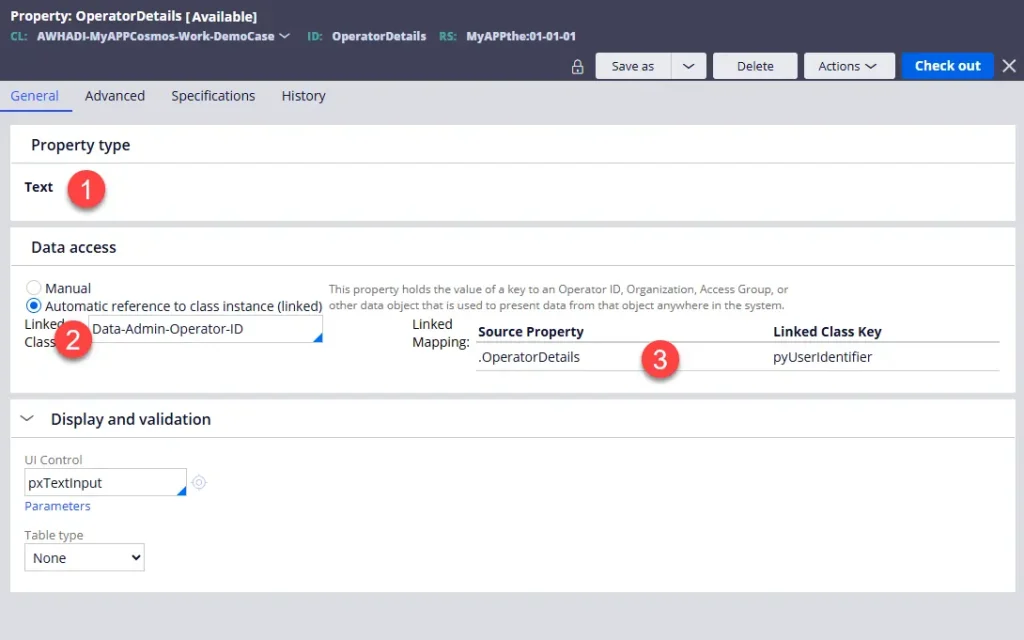
A linked property in Pega is the platform’s way of implementing a relationship between two classes, similar to how a foreign key works in a database—but handled automatically by Pega. or in Technical words.
A linked property in Pega is a single-value property configured with automatic data access to another class. It stores a key value (such as a CustomerID), and when that value is set, Pega automatically resolves the corresponding instance from the linked class. This allows you to directly access related properties, such as name or location, without explicitly calling a data source or writing additional logic.
How Linked Properties Work in Practice in Pega
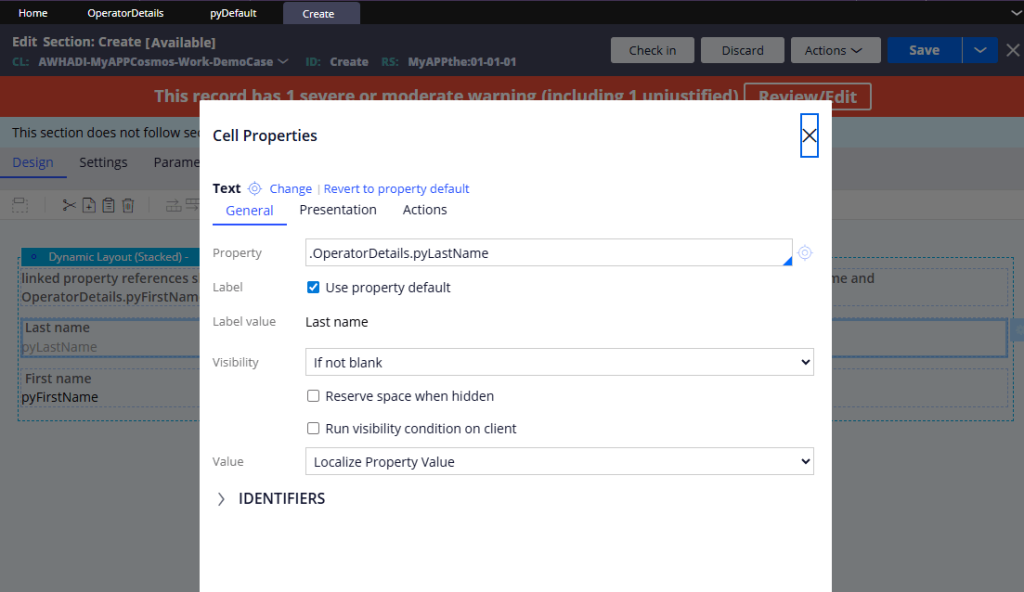
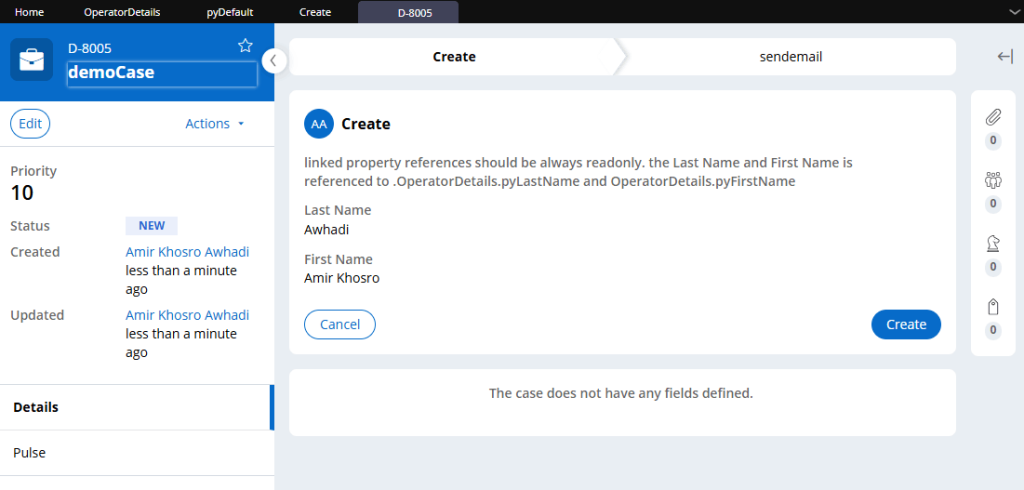
When you assign a value (such as an Operator ID) to the OperatorDetails property, Pega treats that value as the key of the linked class. Whenever you reference a property under it, Pega automatically looks up the corresponding record, loads it into memory (which you can see on the Clipboard under Linked Property Pages), and returns the requested value.
.OperatorDetails.pyFirstName
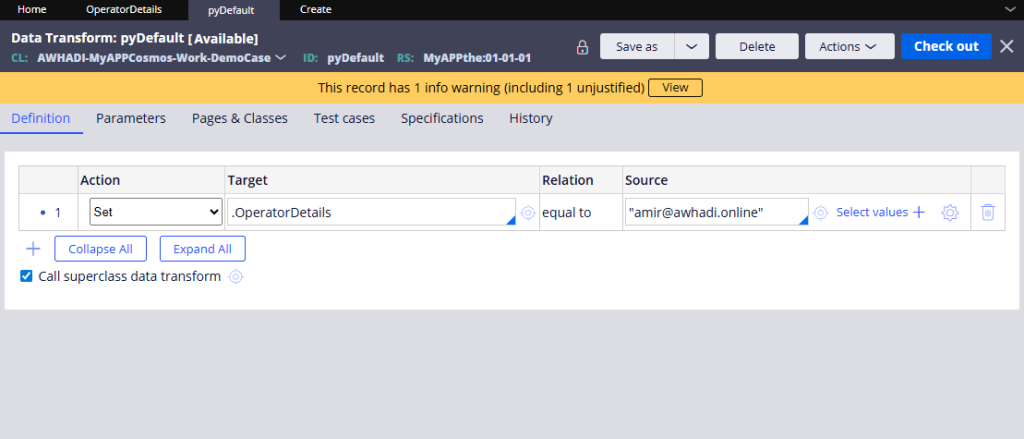
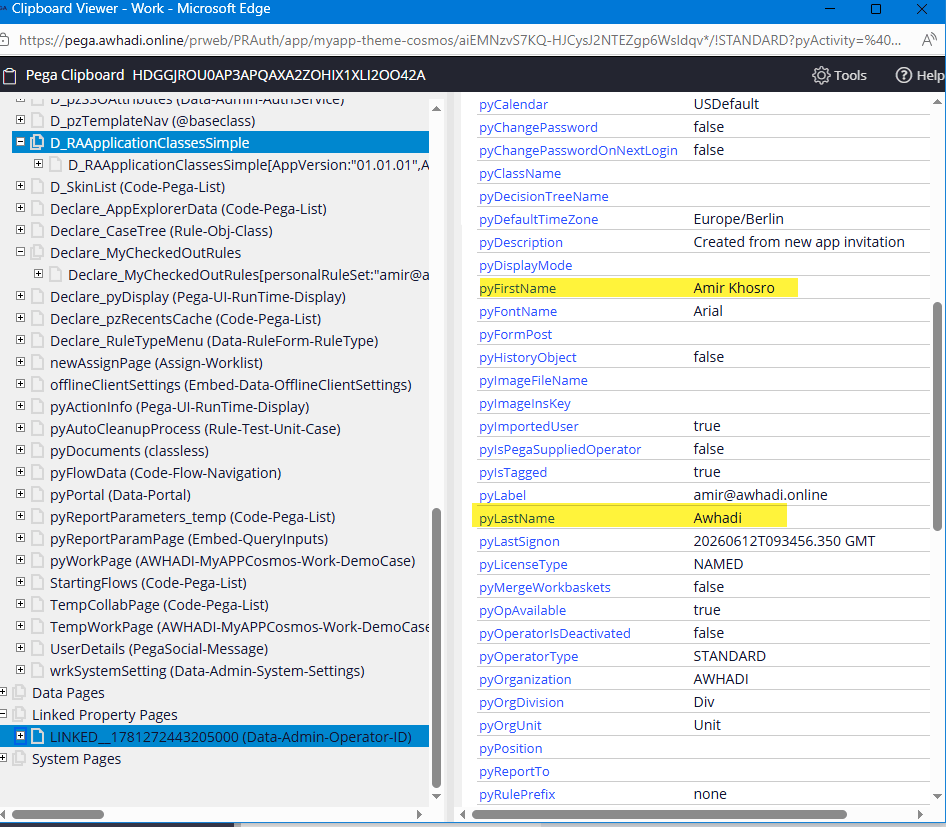
Where does a Linked Property load in Clipboard? and what type of page is this?
Linked property pages are shown explicitly in the Clipboard under Linked Property Pages. These pages are read-only and are not stored in the work object (pyWorkPage) or persisted in the database. They are separate from Data Pages, as they do not follow scopes like thread, requestor, or node level.
A linked property page is created only when the property is accessed. Once created, it exists within the current thread and is used to resolve any references to that linked property.
These pages are temporary and short-lived. They remain available during processing, but are automatically removed when a commit operation occurs or when the thread or session context ends.
For example, in a Demo Case:
- If a section references a linked property, it will be loaded into the Clipboard under Linked Property Pages
- When the flow moves to the next assignment and there is no reference to that linked property anymore, the page may no longer be needed and will eventually be cleared (typically after commit or lifecycle changes)
References
3.Linked property – definition
4.When and how to use linked properties in PEGA? – OneStopPega
5.The Basics of Relational Databases: Primary Keys and Foreign Keys Explained – DEV Community